FeaturesAI editing
Feature 06 · Refine
AI editing
Just ask, and the script and visuals change
Ask something like "Put this chapter in simpler words," and the AI revises the script. You can also leave it to the AI to fix overlapping parts on screen, or to make images, diagrams and short clips.
What it does
What it does
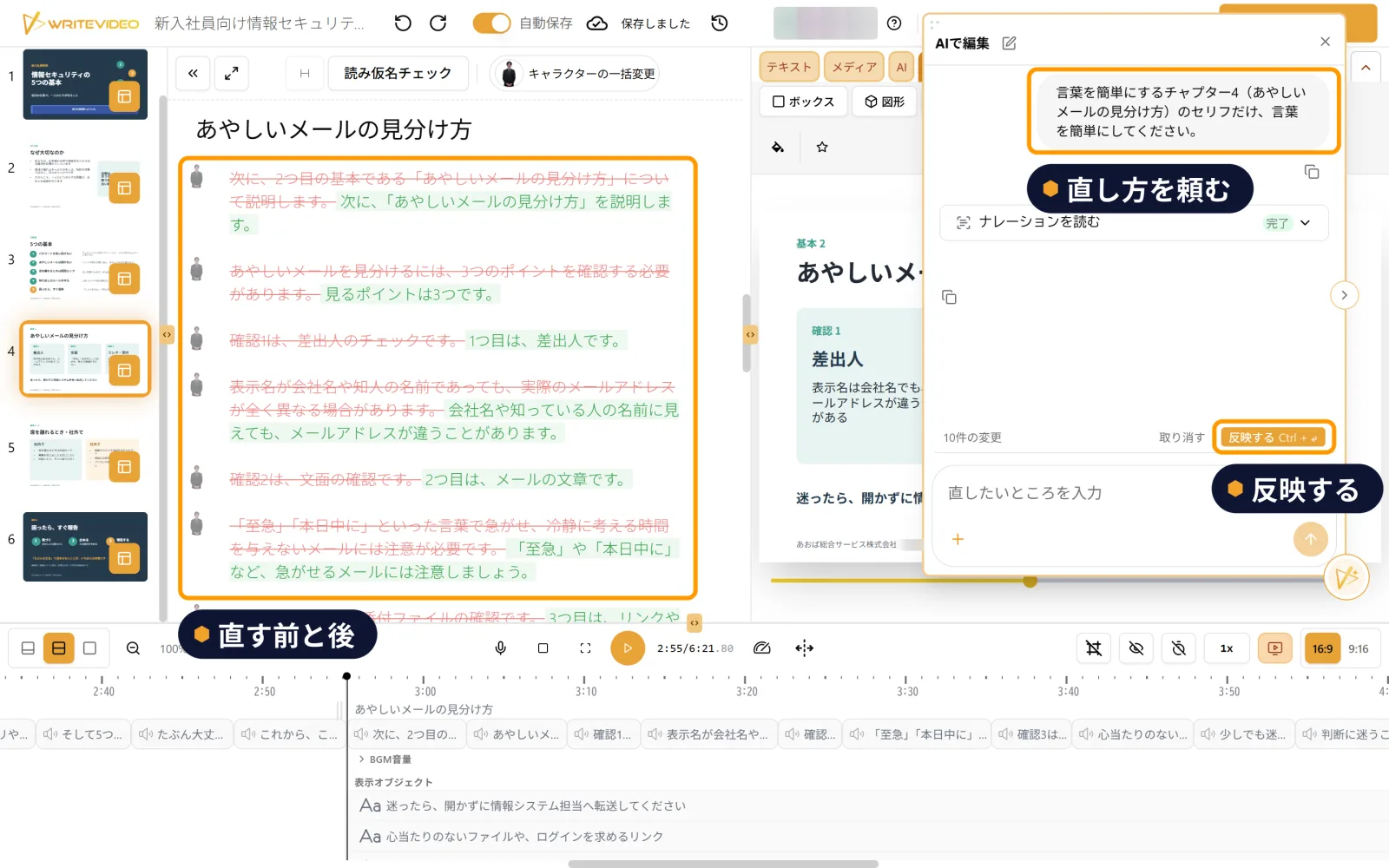
Ask, and the script is revised
Write which chapter you want to change and how, and the AI rewrites the script. The before and after are shown side by side in different colors, so you can compare them before applying the change. Only the chapter you asked about changes; the other chapters stay as they are. Example requests are also provided as buttons.
The AI also tidies overlaps on screen
If parts overlap, choose "Fix overlapping objects" (重なっているオブジェクトを直す) and ask, with a short note on the scene you want fixed. The AI works out how to fix it and shows you the result before you apply it.
Make images, diagrams and short clips with AI
Choose from 10 art styles, such as manga, business and photo, to make images that fit the scene. You can also make diagrams that line up cards with icons, and moving clips of about 8 seconds.
Prepare images to match the lines
You can choose an image to go with each line of the script. Ask the AI, and it makes an image that fits that line.

Features
Features to use with it