Guides & tipsUpdated
How to deliver the videos you make: URL, web page, QR code and MP4
The quickest way to choose how to deliver a video you have made is to start from where it will be watched. We have put together a Q&A on which delivery method suits each common situation.
1. Start by publishing
Q. What should I do first, before delivering it?
A. In "Export video" (動画の出力), go to "Publish as a URL" (URL で公開する) and press "Publish" (公開する). A page where the video can be watched (a share page) is created, the URL and QR code appear in the same panel, and you can also show the embed code.
The recording below shows the URL, QR code and embed code for a published video being brought up in the "Export video" (動画の出力) panel.
2. When you want to show it inside the company
Q. I want to limit who can watch it
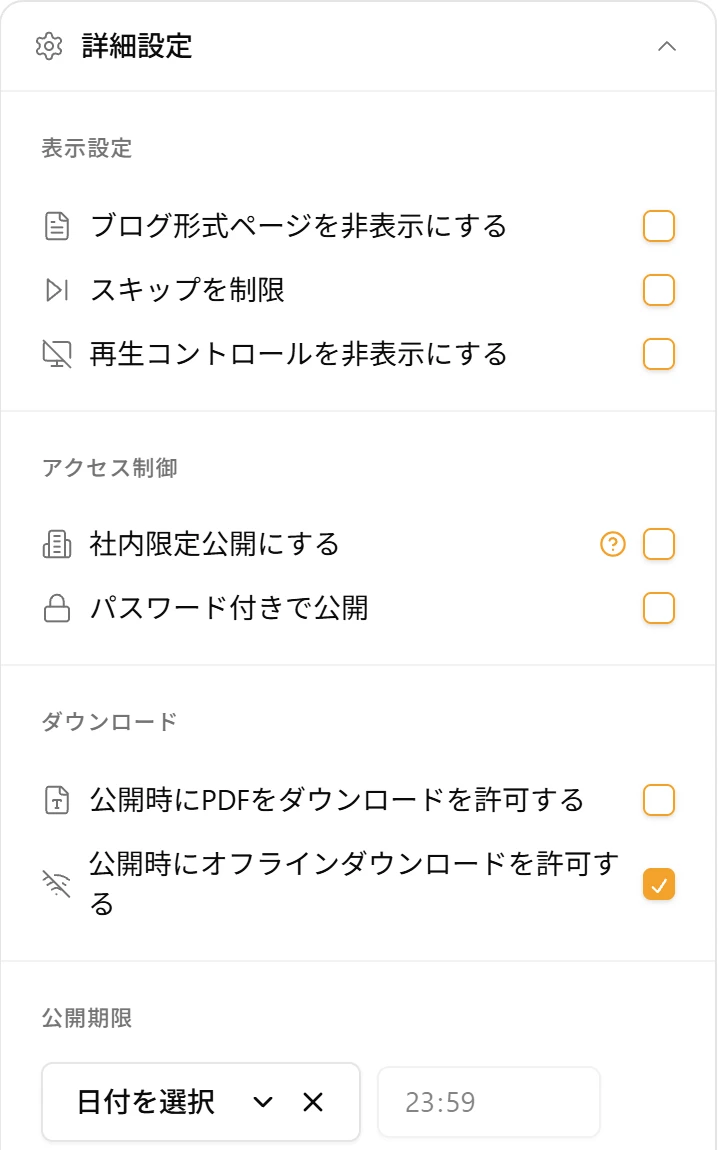
A. In "Advanced settings" (詳細設定) when you publish, you can choose to publish it as internal only or with a password. If it is internal only, only people at the same company who have a WriteVideo account can watch it. You can also set a deadline for viewing.
Q. I want to hand over several training videos together
A. You can line them up in a playlist and keep them together. Videos with a comprehension quiz get a "With quiz" (クイズ付き) mark. You can also give the people you share with view or edit permission.
Q. I want to play it where there is no internet connection
A. From "Export video" (動画の出力), you can export it as an MP4 file.
3. When you want to show it outside the company or on site
Q. I want to hand it out on paper notices or posters
A. Download the QR code that appears when you publish, and put it on paper or posters. Scanning it opens the video's page right there.
Q. I want to put it on our website or internal portal
A. Just paste the embed code (iframe). The introduction video on this site is also posted this way.
Q. I want people of other nationalities to watch it too
A. If you publish it as a URL, viewers can choose their own language on the share page. You can also send a link with the language specified. The video you send can stay as a single Japanese video.
Q. I want to bring several videos together on one page
A. With the Page Editor (beta), you can make a page that combines videos and explanatory text (announced December 28, 2025).
Q. I want to hand it out as a document too
A. With "Download PowerPoint" (PowerPoint をダウンロード), you can turn the slides for each chapter into a PowerPoint file.
4. Quick reference for when you are unsure
| Situation | How to deliver |
|---|---|
| Limit who can watch, or until when | URL (internal only, password, publishing deadline) |
| Hand over several videos together | Playlist |
| Places with no internet connection | MP4 |
| Hand out on paper or posters | QR code |
| Your website or internal portal | Embed |
| Show it to people of other nationalities | URL (viewers choose the language) |
| Bring videos together on one page | Page Editor (beta) |